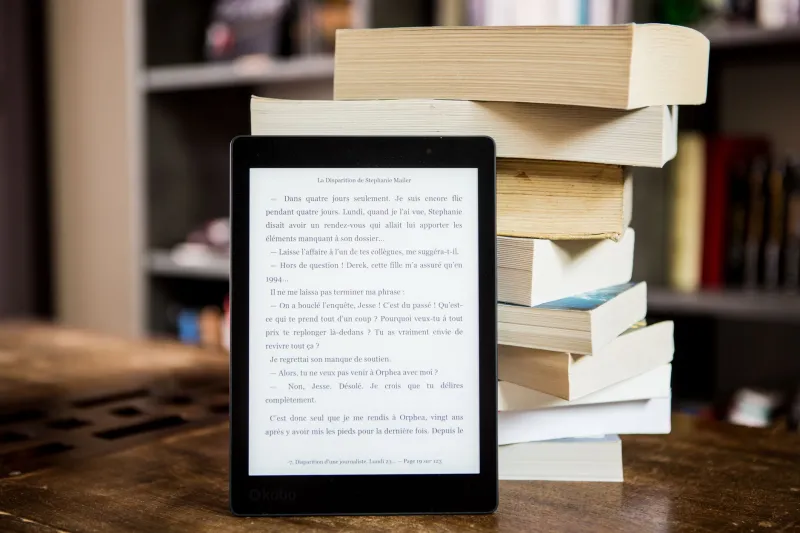
So You Wrote a Book. Now What? Your No-Stress Roadmap to Publishing Your First E-Book

Congratulations — seriously. You finished a manuscript. That alone puts you ahead of the roughly 80% of Americans who say they want to write a book someday but never do. But here's the thing nobody warns you about: finishing the draft is only the halfway point. Getting that book into readers' hands — onto their phones, tablets, and e-readers — is its own project entirely.
The good news? It's way less scary than it looks. Once you understand the moving parts, self-publishing an e-book is genuinely doable, even if you've never touched a formatting tool in your life. Here's how to get there.
Step One: Get Your File Format Straight
Before you upload anything anywhere, you need to understand the three main e-book formats — because picking the wrong one can create headaches down the road.
EPUB is the industry standard. It's flexible, it reflowable (meaning the text adjusts to fit any screen size), and it's accepted by Apple Books, Barnes & Noble's Nook, Kobo, Google Play Books, and most other major platforms. If you're planning to distribute widely, EPUB is your best friend.
 Photo: Barnes & Noble, via 0701.static.prezi.com
 Photo: Amazon Books, via www.suntecindia.com
MOBI was Amazon's preferred format for years, but here's an important update: Amazon has largely moved away from MOBI in favor of their own format called KPF (Kindle Package Format). If you're uploading to Kindle Direct Publishing (KDP), you can actually submit a Word document or an EPUB and Amazon will handle the conversion automatically. So don't stress too much about MOBI.
PDF looks exactly the same on every device, which sounds great — but it's actually a poor choice for most e-books because the text doesn't reflow. Reading a PDF on a phone can feel like trying to read a road map through a keyhole. Reserve PDFs for things like workbooks, guides with heavy formatting, or bonus content you're giving away directly from your website.
The short version: Format to EPUB first. You'll be covered almost everywhere.
Step Two: Choose Your Formatting Tool
Your Word document is not ready to become an e-book as-is. Formatting matters — a lot. A book with weird spacing, missing chapter breaks, or a table of contents that doesn't work will get bad reviews fast, and readers won't give you a second chance.
Here are some solid options depending on your budget:
- Reedsy Book Editor (free): A browser-based tool that's genuinely beginner-friendly. You paste in your manuscript, style your chapters, and export a clean EPUB. Highly recommended for fiction authors.
- Calibre (free): More of a power-user tool, but incredibly useful for converting between formats and fine-tuning your file. There's a learning curve, but plenty of YouTube tutorials exist.
- Vellum (~$200 one-time, Mac only): If you're serious about producing beautiful books and plan to publish multiple titles, Vellum is worth every penny. The output is polished and professional.
- Atticus (~$147, works on any browser): A strong Vellum alternative for Windows users. Handles both formatting and some basic writing features.
Whatever tool you pick, always preview your file before submitting. Both KDP and Draft2Digital offer free previewer tools that show you exactly how your book will look on different devices.
Step Three: Nail Your Metadata (This Is the Part Most First-Timers Skip)
Metadata is basically everything about your book that isn't the book itself — your title, subtitle, author name, description, categories, and keywords. It's also one of the biggest factors in whether readers actually find your book.
A few things to get right:
Your book description is your sales pitch. It's not a summary — it's a hook. Study the descriptions of bestselling books in your genre on Amazon. Notice how they open with tension or intrigue, not with "This book is about..."
Categories and keywords determine where your book shows up in search results. On KDP, you can select two main categories, but you can email Amazon to request up to ten. Use all of them wisely. Tools like Publisher Rocket (paid) or just careful browsing of Amazon categories can help you find the right niches.
Your author name should be consistent everywhere — same spelling, same format — across every platform you publish on. This helps readers find your other work and builds your discoverability over time.
Step Four: Pick Your Publishing Platforms
You've got two main paths here: go exclusive with Amazon, or distribute wide.
KDP Select means your e-book is only available on Amazon, but you get access to Kindle Unlimited (where you earn money based on pages read) and some promotional tools. If your target readers are heavy Amazon shoppers, this can be a smart starting move.
Wide distribution means publishing on Amazon and other platforms — Apple Books, Kobo, Barnes & Noble Press, Google Play Books, and more. You can manage these individually, or use a distributor like Draft2Digital or Smashwords (now part of Draft2Digital) to push your book everywhere from one dashboard. Going wide takes more setup but reduces your dependence on a single retailer.
For most first-time authors, starting with KDP and then expanding wide after your first few months is a reasonable approach.
Step Five: Set a Realistic Timeline
Here's an honest look at how long this process actually takes when you're doing it for the first time:
- Formatting: 1–3 days (longer if you're learning a new tool)
- Cover design: 3–7 days (don't skip this — a bad cover kills sales; consider hiring a designer on Reedsy or 99designs if design isn't your thing)
- Writing your book description and metadata: 1–2 days
- Uploading and reviewing proofs: 1–2 days
- Platform review and go-live: 24–72 hours on most platforms
All in, plan for about two weeks from "done editing" to "live on Amazon" — assuming you're not scrambling to fix major formatting errors along the way.
Common Rookie Mistakes to Avoid
A few pitfalls that catch first-timers off guard:
- Uploading a Word doc without cleaning it first. Hidden formatting from copy-pasting, weird fonts, and manual line breaks will create a mess. Use the "clear formatting" function and do a full cleanup before you import anywhere.
- Setting the wrong price. Research comparable titles in your genre. E-book pricing in the US typically ranges from $0.99 to $9.99, with the $2.99–$4.99 sweet spot being popular for indie authors who want to earn a solid royalty (70% on KDP between $2.99 and $9.99).
- Ignoring your cover. Readers absolutely judge books by their covers, especially in thumbnail view on a phone screen. Invest here.
- Publishing too fast. Give yourself time to do at least one full proof read of your formatted file. Errors that weren't visible in your Word document have a way of appearing once the file is formatted.
You're Ready for This
The digital publishing world has genuinely leveled the playing field for writers. The tools are better than ever, the platforms are accessible, and readers are hungry for new voices. Yes, there's a learning curve — but it's a manageable one, and you only have to climb it once.
Your book deserves to be read. Go get it out there.